Using Metadensity in Jupter notebooks#
This notebook showcases SF3B4, U2 density around branchpoints
[1]:
# set up files associated with each genome coordinates
import metadensity as md
md.settings.from_config_file('/home/hsher/projects/Metadensity/config/hg38.ini')


# then import the modules
from metadensity.metadensity import *
from metadensity.plotd import *
import pandas as pd
import matplotlib.pyplot as plt
%matplotlib inline

# I have a precompiles list of ENCODE datas as a csv that loads in this dataloader
import sys
sys.path.append('/home/hsher/projects/Metadensity/scripts')

plt.style.use('seaborn-white')
please set the right config according to genome coordinate
Using /home/hsher/gencode_coords/GRCh38.p13.genome.fa
Using:  /home/hsher/gencode_coords/gencode.v33.transcript.gff3
load RBPs into eCLIP object#
[2]:
# download this thing from https://www.dropbox.com/s/cgkeuqr0cjif558/test_data.tar.gz
menifest = pd.read_csv('/home/hsher/projects/Metadensity/test_data/menifest.csv')
[5]:
menifest.loc[(menifest['RBP'] == 'SF3B4')].iloc[0]
[5]:
Unnamed: 0                                                         0
bam_0              /home/hsher/projects/Metadensity/test_data/pro...
bam_control_0      /home/hsher/projects/Metadensity/test_data/pro...
minus_0            /home/hsher/projects/Metadensity/test_data/cov...
minus_control_0    /home/hsher/projects/Metadensity/test_data/cov...
plus_0             /home/hsher/projects/Metadensity/test_data/cov...
plus_control_0     /home/hsher/projects/Metadensity/test_data/cov...
bed_0              /home/hsher/projects/Metadensity/test_data/SF3...
uid                                                       SF3B4_test
RBP                                                            SF3B4
Name: 0, dtype: object
[3]:
SF3B4 = eCLIP.from_series(menifest.loc[(menifest['RBP'] == 'SF3B4')].iloc[0],
                          single_end = False)
[4]:
clips = [SF3B4]
Calculate Density and Truncation sites#
Object Metatruncation and Metadensity takes three things: 1. an experiment object eCLIP or STAMP. 2. a set of transcript pyBedTools that you want to plot on 3. name of the object
Options include: 1. sample_no= allows you to decide how many transcript you want to build the density. It will take longer. By default, sample_no=200. So in transcript if you give more than 200 transcripts, only 200 will be used 2. metagene allows you to use pre-built metagene. This feature is more useful when you want to compare the same set of RNA over many RBPs. 3. background_method handles how you want to deal with IP v.s. Input 4. normalize handles how you want to
normalize values within a transcript.
Difference between truncation and density#
Metadensity represents read coverage. Metatruncation represents the 5’ end of read 2 for eCLIP; edit sites for STAMP.
[5]:
# here for the set of transcript, we use the IDR peak containing transcript assuming they have good signal
def build_idr_metadensity(eCLIP):
    ''' build metadensity object for eCLIP and its idr peak containing transcript'''
    m = Metadensity(eCLIP, eCLIP.name,background_method = 'relative information', normalize = False)
    m.get_density_array()
    return m
def build_idr_metatruncate(eCLIP):
    ''' build metadensity object for eCLIP and its idr peak containing transcript'''
    m = Metatruncate(eCLIP, eCLIP.name,background_method = 'relative information', normalize = False)
    m.get_density_array(use_truncation = True)
    return m
[6]:
# this step takes some time for building metagene from the annotation files.
den = [build_idr_metadensity(e) for e in clips]
trun = [build_idr_metatruncate(e) for e in clips]
Warning: No IDR file input, falling back to using peaks from rep rep1
Using: /home/hsher/Metadensity/metadensity/data/hg38/gencode
Done building metagene
/home/hsher/miniconda3/envs/metadensity/lib/python3.7/site-packages/metadensity/metadensity.py:967: RuntimeWarning: Mean of empty slice
  feature_average  = np.nanmean(np.stack(all_feature_values), axis = 0)
need at least one array to concatenate
Warning: No IDR file input, falling back to using peaks from rep rep1
Using: /home/hsher/Metadensity/metadensity/data/hg38/gencode
Done building metagene
/home/hsher/miniconda3/envs/metadensity/lib/python3.7/site-packages/metadensity/metadensity.py:967: RuntimeWarning: Mean of empty slice
  feature_average  = np.nanmean(np.stack(all_feature_values), axis = 0)
need at least one array to concatenate
Visualize RBP map: individual density per transcript#
use feature_to_show to decide what features to show.
[7]:
### PLOT INDIVIDUAL DENSITY
# you can customize the list of features you want to show. This is suitable when you are looking for splicing
f = plot_rbp_map(den, features_to_show = generic_rna)
/home/hsher/miniconda3/envs/metadensity/lib/python3.7/site-packages/metadensity/plotd.py:187: RuntimeWarning: Mean of empty slice
  density_concat = np.nanmean(np.stack([den_arr[feat,align, r] for r in m.eCLIP.rep_keys]), axis = 0)

[8]:
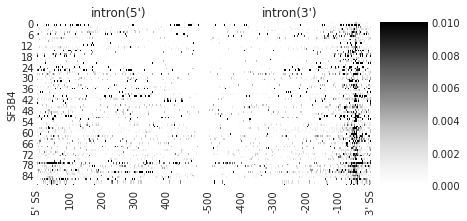
### PLOT INDIVIDUAL TRUNCATION SITES

f = plot_rbp_map(trun, features_to_show = ['intron'], cmap = 'Greys', ymax = 0.01)
f.savefig('SF3B4_rnamap.svg', dpi = 300)
[9]:
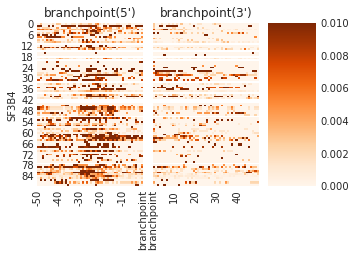
### PLOT INDIVIDUAL TRUNCATION SITES

f = plot_rbp_map(trun, features_to_show = ['branchpoint'], ymax = 0.01, cmap = 'Oranges')
f.savefig('SF3B4_brmap.svg', dpi = 300)
[10]:
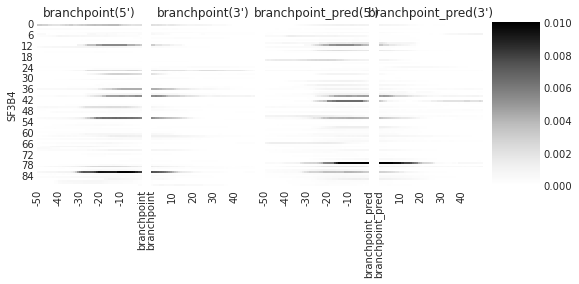
### PLOT INDIVIDUAL DENSITY SITES
f = plot_rbp_map(den, features_to_show = branchpoints, ymax = 0.01)
[11]:
### PLOT INDIVIDUAL TRUNCATION SITES

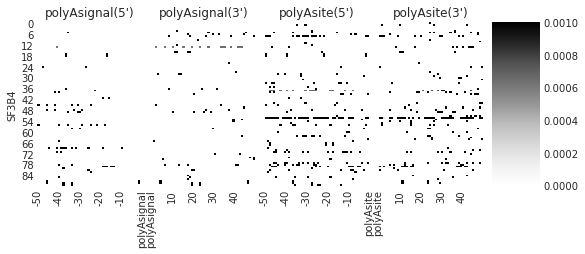
f = plot_rbp_map(trun, features_to_show = polyAs, ymax = 0.001)
Median and Mean density#
[12]:
color_dict = {'SF3B4': 'royalblue', 'SF3A3':'mediumorchid', 'U2AF1':'tomato'}
[13]:
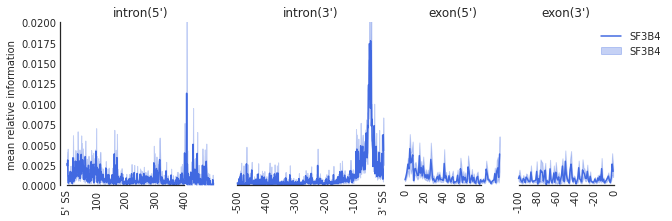
f=plot_mean_density(trun,
                    features_to_show = ['intron', 'exon'], ymax = 0.02,
                   color_dict = color_dict)
f=beautify(f, offset = 0) # sns.despine
f.get_axes()[0].set_ylabel('mean relative information')
f.savefig('SF3B4_rna.svg', dpi = 300)
[14]:
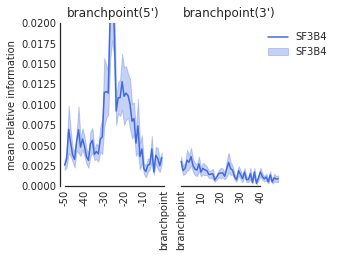
f=plot_mean_density(trun,
                    features_to_show = ['branchpoint'], ymax = 0.02,
                   color_dict = color_dict)
f.get_axes()[0].set_ylabel('mean relative information')
f=beautify(f, offset = 0) # sns.despine
f.savefig('SF3B4_br.svg', dpi = 300)